Do not extend the cable running from the cabinet (24V).
If necessary, only extend the cable from the transformer side (220V).
You can find the drilling template here
Rotaid and its holding company Trisult b.v. conduct their business in conformation with the GDPR/AVG guidelines and regulations.
Yes, Rotaid and its holding company Trisult b.v. conduct their business in conformation with the EU MDR guidelines and regulations. All Rotaid cabinets are EU MDR compliant.
The heating system consumes approximately 220 – 240 kWh per year. Measured in the Dutch climate.
The power consumption is directly related to the specific climate condition. For your reference, the 24/7 cabinet when placed in a moderate climate like the Netherlands or Belgium, uses between 150Kwh and 170Kwh of electricity per year. You can compare the power consumption of a Rotaid 24/7 to a LED television.
Please contact insurance@rotaid.com if you want to take out an insurance for your AED & AED cabinet.
The insurance does not cover: other materials stored in the cabinet, used or expired batteries and electrodes, damage or loss incurred during use of device or AED defects.
The insurance covers external harm, theft and vandalism for both AED and AED cabinet.
At the moment, the insurance is available in the following countries:
- Belgium
- Denmark
- Germany
- Italy
- Luxembourg
- The Netherlands
- Norway
- Poland
- Sweden
Check www.rotaid.com/dealers for our European dealer network.
You can also contact us directly at info@rotaid.com or +31 (0)478 769 052.
Click here to view our AED compatibility list.
View the picture to view where you can find your cabinet's serial number.

View the picture to view where you can find your cabinet's serial number.

View the picture to view where you can find your cabinet's serial number.

A warranty of 2 years applies to all products of Rotaid AED Cabinets.
Click here to download the warranty conditions.
The Rotaid 24/7 outdoor cabinet comes with a 24 volts, 3.75 A transformator that can be plugged into a regular 220V socket. Instructions for proper installation of the cabinet and its power source can be found in the installation manual on rotaid.com/support.
The power consumption is directly related to the specific climate condition. For your reference, the 24/7 cabinet when placed in a moderate climate like the Netherlands or Belgium, uses between 150Kwh and 170Kwh of electricity per year. You can compare the power consumption of a Rotaid 24/7 to a LED television.
The Rotaid 24/7 module has a standalone mobile data connection and needs no Wi-Fi or other computer network to establish an internet connection.
The Rotaid 24/7 comes with a pre-installed SIM card that automatically connects to 2G, 4G and CAT M1 network, depending on availability. If the connection is terminated, the cabinet will automatically select an alternative network. The SIM card is activated immediately once the cabinet is connected to electricity.
It is a personal online platform where you can: adjust one or multiple Rotaid 24/7 outdoor cabinets, check the realtime status of the AED’s or manage automated SMS and email notifications and responders related to occurrences with the cabinet.
Log in with your username and password or create a new personal account on Rotaid 24/7 dashboard.
Follow the instructions on Rotaid 24/7 dashboard to create a personal profile and set a password. In line with the AVG/GDPR regulations Rotaid does not store passwords. Resetting a password can be done via the same system.
Ready carefully our user manual https://dashboard.rotaid247.com/Document/UserManual.
Besides a Rotaid 247 Connected Cabinet, a software subscription is required for online use and messaging. You can purchase a voucher for a certain period. The serial number of the cabinet & the voucher number for the software subscription is required before setting up your 247 dashboard and start monitoring.
No, the rotaid 24/7 module is delivered with a fully operational sim card that has worldwide coverage for a mobile data network connection.
The module is compatible with the Rotaid Solid Plus cabinet and the Rotaid Solid Plus Heat cabinet.
Light colours can be adjusted via the personal dashboard on Rotaid 24/7 dashboard.
Upon delivery the light is set to green. This is the light that is continually on whenever the cabinet is closed and connected to power. When the cabinet is opened the light blinks red. When the AED is then removed the audible alarm, when set to on, is sounded. If the cabinet is set to testmode the light shows a rainbow colored pattern. Via dashboard.rotaid247.com you are able to change the default ring color.
No, The heating system on the Rotaid 24/7 outdoor cabinet is fully automized and ensures proper functioning of the cabinet in combination with the AED in all weather conditions.
No, for visibility purposes the light ring is always on. However, the colour inside the cabinet can be adjusted via Rotaid 24/7 dashboard.
After registration on Rotaid 24/7 dashboard, the correct AED can be selected from a drop down list.
A list of the compatible AED’s can be viewed here.
Administrators can be changed via dashboard.rotaid247.com using the “change owner” button. Account owners cannot be changed.
There is no physical connection between the AED and the cabinet. The AED has an autonomous battery and does not need any power from the cabinet. The AED’s audible warning system is detected via a special microphone and detection protocol and algorithm.
The elastic strap has a velcro strip and buckle that can be used to firmly strap different AED sizes.
The alarm can either be silenced or set to two different loudness settings (84dB or 98dB) via the personal dashboard on dashboard.rotaid247.com.
Whenever an AED indicates a failure, it will sound an alarm tone. This tone and its frequency and sequence, is picked up by the cabinet. After detection of the failure, the cabinet immediately sends out a signal to the dashboard that triggers a notification to an appointed user or responder. In order for this system to work correctly, it is crucial that the AED that is placed inside the cabinet is selected in the dashboard. The cabinet will not detect other audible warnings, these are ignored. It will specifically detect the tone of the AED that has been selected.
Yes, once the brand of type of AED placed in the cabinet is changed, the type and brand can be adjusted on dashboard.rotaid247.com. This can be done as often as needed and requires no hardware changes on the cabinet side.
For proper functioning, it is crucial to select the right type of AED. If a wrong type of AED has been selected it will cause the cabinet not to detect the audible warnings from the AED. Via the portal, the brand an type of AED can be adjusted at all times.
This feature has no actual function now, it is built in for possible future opportunities.
The black button is a fail-safe system. Pressing and holding the button for 5 seconds places the cabinet in a Maintenance mode, this will disable the alarm and automatic notifications. The button can be used when the cabinet is opened unintentionally. When performing regular maintenance it is advised to place a cabinet in Maintenance mode via the dashboard. Whenever a cabinet is closed it disables its maintenance mode and is placed in regular mode.
Check the power cables for proper connection. Double-check the order the blue (-) and brown (+) power cable connections. Also makes sure the transformer unit is properly connected.
Whenever the order (polarity) of the cables is reversed the light, alarm and connection module of the cabinet will not operate.
24 Hours after disconnection of the power, a notification is sent. This is to evade needless notifications when the cabinet is disconnected for short periods of time or power glitches.
Our downloadable 'Quality report' shows a comprehensive list of certifications and registrations for the Rotaid 24/7 outdoor cabinet.
Rotaid and its holding company Trisult b.v. conduct their business in conformation with the GDPR/AVG guidelines and regulations.
All our cabinets only require a short twist to the left to open. The whole cover comes of to provide full access to the defibrillator. The cover is fixated to the backplate via a belt and does not require your immediate attention after opening.
To close the cabinet, make sure the heart is upright on the cover, place the cover about 15 centimetres to the left (counter clockwise) and then twist to the right until the cover cannot move any further. Please also make sure to enclose the steel hook in the cover when placing the cover.
The alarm is triggered when the cabinet is opened and will sound continuously for 15 minutes. After 15 minutes, it will beep every 5 minutes. On the bottom of the alarm unit, a small red button can be found. When the alarm is sounding, this button can be pushed to temporarily pause the alarm. When the cover is placed back onto the cabinet, a dual tone signal is heard. This signals the alarm is functioning normally again. On the bottom a white volume switch can be found to select the loudness level. When switched to the left, an 84dB loudness is selected. When switched to the right, a98 dB loudness is selected. Two AA-batteries power the alarm system for approximately 24 months and can be found in the materials package.
For more info see spec sheet.
Check if the magnet, that is part of the closing system of the cabinet, is in place. If so, please contact your cabinet supplier.
The cover needs no maintenance. For a high-quality appearance, you can clean the cover from time to time with a damp cloth to remove dirt and any residual sand.
The back plate requires no maintenance.
For optimal performance, replace both AA batteries once every 24 months. Only use Alkaline batteries for optimal performance and life span.
The heater works fully automated and will switch on during cold temperatures thanks to the built-in thermostat and controller. Please make sure the socket that powers the heating device will be marked ‘do not unplug AED cabinet’ to prevent loss of power.
In case of a malfunction or power loss, your heating device will not work anymore.
If so, check your power supply/contact your official Rotaid AED Cabinets distributor for further assistance.
The LEDS burn continuously. This makes your AED visible during the dark hours. In case of a malfunction or power loss, the LEDs blink or are off. If so, check your power supply/contact your official Rotaid AED Cabinets distributor for further assistance.
If your transformer is connected to power, the small light (blue/purple) should be visible on the transformer.
Use the two long bolts and pre-drilled holes on the top of the backplate to hang the defibrillator via its handle or carrying case.
Place the defibrillator on the platform.
Use the elastic Velcro band to secure the defibrillator.
The printed guide is located in the box and provides guidance for a correct installation.
Or download here:
The best place for a cabinet is in plain sight making it easy to spot in case of a cardiac arrest. The cabinet needs to be installed on a flat surface to prevent deforming of the backplate. Preferably outdoor so the cabinet can be accessed at all times. For a SPH & 247 a power socket is needed. The cabinet can withstand weather conditions but should never hang in direct sunlight.
Yes, all Rotaid cabinets can be installed on a totem. The instruction manual for installing the cabinet can be downloaded here.
The Rotaid 24/7 cabinet connects wirelessly to 2G/3G/4G networks available in your surroundings using it built-in SIM card. Rotaid 24/7 does not need Wi-Fi connection.
The Rotaid 24/7 cabinet recognises your AED's beep pattern and listens 24 hours a day to the AED. If your AED has a failure and the beep pattern changes, Rotaid 24/7 will be alarmed and will directly inform you.
Yes, the Rotaid 24/7 cabinet has a built-in SIM card for wireless connection. No Wi-Fi connection is needed.
No, the Rotaid 24/7 does not need a Wi-Fi connection. It has a built-in SIM card that remotely connects to available 2G/3G/4G networks in your surroundings.
Rotaid AED Cabinets works with a fully ISO-certified supply chain to ensure quality and continuity of its businesses.
All Rotaid cabinets are successfully tested by an Eurofins company on the following quality standards:
- IP56: protection against intrusion of foreign bodies such as other solids and liquids
- IK10: the highest vandal resistance
- Salt-mist protection: corrosion resistance
- Signal interference
Download the Rotaid cabinet product quality report here: Rotaid-Quality-Report.pdf
Follow this link to get access to the Insurance brochure:
Rotaid-Insurance.pdf
Almost all parts of Rotaid products are manufactured with durable and recycled materials. Unfortunately, not all parts at this time can be manufactured from durable materials but Rotaid and its suppliers are constantly reviewing alternative materials and production methods that allow for an even more durable manufacturing process. All electrical and non-electrical components in Rotaid products can be fully recycled and will eventually find their way in other products.
Yes, you can buy spare parts via the official Rotaid reseller in your country.
Our Rotaid cabinet follows a modular, retrofittable approach. You can upgrade one solution to another: easy and cost-friendly. We offer solutions for every case. Our Rotaid 24/7 is our most complete and effective AED storage system.
This modular approach is sustainable, efficient, and makes sure we can always offer a solution for your AED challenge.
The ideal mounting position for the Rotaid cabinet is 150 centimeters (59 inches), measured from the center of the cabinet to the floor. Please note: this may not apply to all countries.
No, Rotaid Solid Plus cabinets do not need power.
Yes, the Rotaid Solid Plus Heat LED does need a power supply.
Yes, the Rotaid 24/7 does need a power supply.
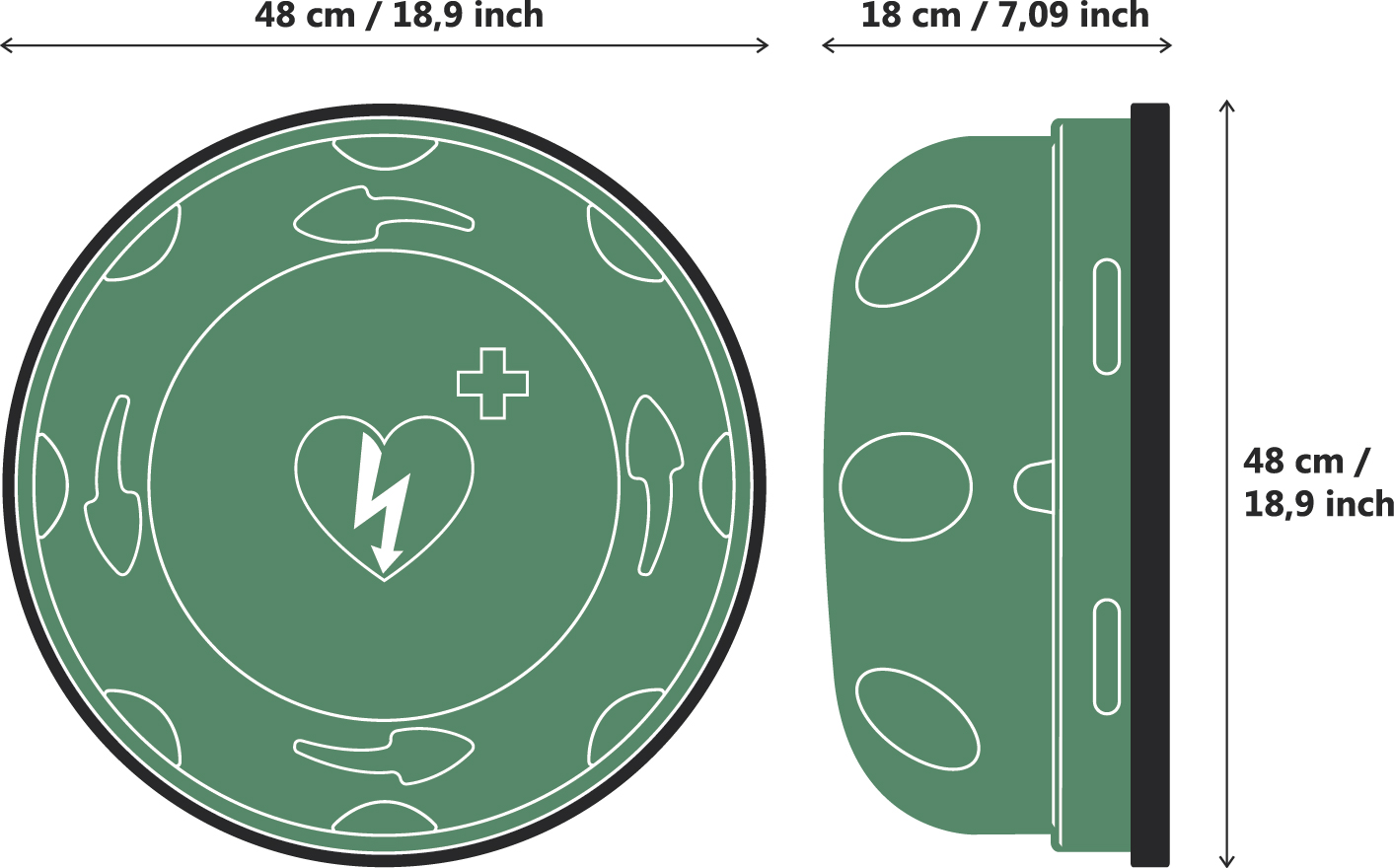
Rotaid's cabinets have the following dimensions:
- Length: 48 cm / 18,9 inch
- Width: 48 cm / 18,9 inch
- Depth: 18 cm / 7,09 inch
- Weight Rotaid 24/7: 4 kg / 8.82 lb
- Weight Rotaid Solid Plus: 1,8 kg / 4.1 lb
- Weight Rotaid Solid Plus Heat: 3,2 kg / 7.05 lb
Follow this link to download the Rotaid 24/7 installation manual: Rotaid247_installationmanual.pdf
Follow this link to download the installation manual: Rotaid-SolidPlusHeat-InstallationManual.pdf
Follow this link to download the installation manual for the Rotaid Solid Plus: Rotaid_solidplus_im.pdf
The alarm is triggered when the cabinet is opened and will sound continuously for 15 minutes. After 15 minutes, it will beep every 5 minutes. On the bottom of the alarm unit, a small red button can be found. When the alarm is sounding, this button can be pushed to temporarily pause the alarm. When the cover is placed back onto the cabinet, a dual tone signal is heard. This signals the alarm is functioning normally again. On the bottom a white volume switch can be found to select the loudness level. When switched to the left, an 84dB loudness is selected. When switched to the right, a98 dB loudness is selected. Two AA-batteries power the alarm system for approximately 24 months and can be found in the materials package.
For more info see spec sheet.

